Find the play.
Review the details.
Upload game film or import from an authorized team library. Use the clip grid to move between plays and review tags, feedback, and the video together.
Clips · play tags · shared team libraries
Football + basketball film review
Organize game film, review play-by-play feedback, build highlights, and ask AI Coach about a specific clip. Bring your playbook to compare the assignment with what happened on film.
Players review their own clips. Coaches work across the roster, approve assignments, and share corrections with the team.
Upload game film or import from an authorized team library. Use the clip grid to move between plays and review tags, feedback, and the video together.
Clips · play tags · shared team libraries
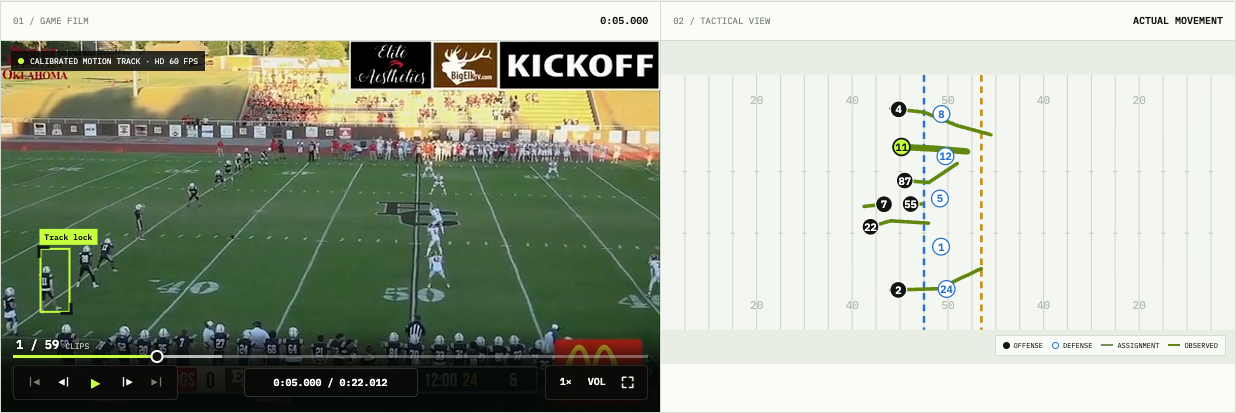
Select the player you want to follow. Tracking overlays depend on available track data; the Play Lens beta explores film and 2D movement side by side. Build highlight selections from the clips you choose.
Player marker · clip selections · highlights
Play Lens visualization: beta
Upload a PDF, text document, or ZIP playbook. Review the extracted concepts and assignments before linking an approved play to a clip for execution analysis.
Reviewed concepts · player assignments · film comparison
Open a clip and ask, “What did you mean by late hands?” AI Coach uses saved analysis and approved assignments to explain the feedback in context.
Clip-linked conversation · explanations · next-rep corrections
Use saved analyses to review player feedback, opponent tendencies, and areas to work on. Check the underlying plays before turning a pattern into a coaching decision.
Scouting reports · tendencies · player development records
Football is analyzed by snap. Basketball is analyzed by possession. Neither engine should fill gaps in the footage with confident guesses.
Choose a player, unit, or whole-play analysis. The engine reviews visible actions, records play-level observations, and returns strengths, corrections, and grades where evidence supports them.
Review a possession as a sequence of decisions and actions. The engine separates the choice a player made from how well the action was executed, then connects feedback to the possession.
This is a sample of the feedback structure: assignment, result, execution, and a correction to review. It is not a measured player result.
Coaching point: first step and pad level were right. Hand placement drifted outside the frame on contact — the win came from leverage, not technique. Rep the punch.
Football and basketball have dedicated analysis engines. Other sports are in beta testing; public film analysis is not available for those sports yet.
Start with two free personal film analyses. Ongoing Player Access is $79.99/month or $719.99/year. You are only charged if you separately start a paid subscription.
For one athlete and their family.
For coaches and whole programs.
Two free personal film analyses. Team access and program pricing are available for coaches.